Modern Backup for MaxDB
MaxBack is a backup solution that extends the built-in backup and restore capabilities of SAP MaxDB™ databases by adding support for Windows VSS Backup and Restore.
Do you run SAP MaxDB on Windows?
Then you need MaxBack!
Veeam Integration
- MaxBack is fully compatible with the leading backup products from Veeam.
Snapshot backups
- No more waiting hours for backups! Enable storage snapshot backups for your MaxDB databases.
Hypervisor snapshots
- Take consistent snapshots of your MaxDB databases when creating VMWare or Hyper-V snapshots.
Point-In-Time Recovery
- Autorecover databases from entire VM restores and apply additional transaction logs after any kind of restore.
Log Management
- Automatically include log backups in your VM backups. Delete them only if backups are successful.
System copies
- No more waiting days for a SAP system copy. Restore DB volumes from production backups and let MaxBack handle the database migration.
Monitoring & Alerts
- Get notified by email or webhook when backups fail. Built-in watchdog monitors services and restarts them automatically.
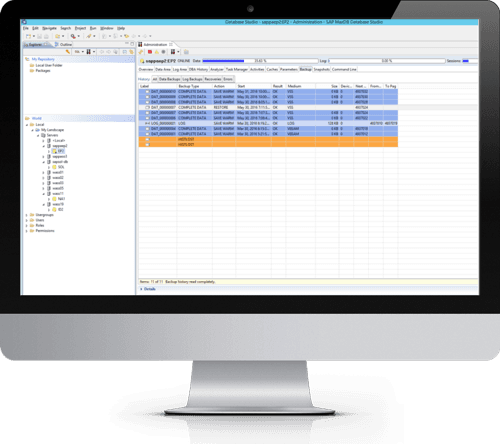
Backup history
- No more black box if your backups were successful. Keep track of your backups even when they run on host or VM level.
Why choose MaxBack
Vendor Independent
- With MaxBack, you integrate your MaxDB backups and restores in the Windows Volume Shadow Copy Service (VSS). VSS is the base technology for all backup products that support consistent backup of Windows, and is not specific to any backup tool vendor.
Battle tested for years
- MaxBack has been deployed and run for years in production environments. It is fully supported by SAP and helps to keep hundreds of databases save.
Just works
- MaxBack - once installed and configured - requires no additional work and knowledge of your backup and SAP experts. They will almost forget about it.
How it works?

Database snapshot
The Windows VSS Services interacts with the MaxBack VSS Writer and creates a snapshot of all database files.
MaxBack ensures that the database is in right state for backup and that the snapshot of the database is consistent.

Run your favorite backup tool
MaxBack can be used with any backup tool that support Windows VSS backup of bare metal or virtual machines.For example:

Data transfer
The Backup tool can now transfer the data to the backup store from the consistent snapshot.
If you use a storage with hardware Snapshot support - like NetApp - the data can be directly read from the hardware snapshot.
Run your favorite backup tool
MaxBack can be used with any backup tool that support Windows VSS backup of bare metal or virtual machines. (for example Veeam with Guest Processing enabled).
Database snapshot
The Windows VSS Services interacts with the MaxBack VSS Writer and creates a snapshot of all database files.
MaxBack ensures that the database is in right state for backup and that the snapshot of the database is consistent.
Data transfer
The Backup tool can now transfer the data to the backup store from the consistent snapshot.
If you use a storage with hardware Snapshot support - like NetApp - the data can be directly read from the hardware snapshot.
Simple pricing
Per database instance licensing. Pick the support level that fits your environment.
Standard
Perpetual license with standard support.
- VSS Writer 3.x usage right
- Perpetual license
- Bug fix updates
Subscription
Upgrades, consulting, and fallback license.
- Upgrade to any version
- Extended support & consulting
- Perpetual fallback license
- Downgrade right
Enterprise
3 years extended support & long-term maintenance.
- VSS Writer 3.x usage right
- Long-term bug fix updates
- Third-party tool support
- Downgrade right
All prices per database instance, excl. VAT.
Frequently asked questions
Is MaxBack SAP certified?
No. SAP only certifies MaxDB backups for Backint Integration and not for Storage based backup like VSS snapshot backup. However, the backup is still supported by SAP, as we use the external backup feature of MaxDB. See SAP note 1928060 for details.
Do you offer a trial license?
Yes!
Just download the latest installer and sign up for a new account. When you sign up, you will be asked if you would like to have a trial license.
Why not just suspend the logwriter instead?
Before SAP has added the external backup feature, suspending the log writer was the only method to keep MaxDB consistent for snapshot backups.
However, just suspending the log writer has a lot of disadvantages. Besides the short standstill of the DB, it is almost the same as a crash consistent backup. So in case of a restore, MaxDB knows nothing about the backup and cannot be recovered beyond the snapshot.
How many licenses do I need?
MaxBack is licensed per database instance — including production, QA, development, and test systems. See our pricing page for full licensing details.
Contact Sales
We'd love to hear from you! Just send us a message using the form below.
Contact Sales
Have questions about pricing or enterprise features?
We care about your privacy. Read our privacy policy.